
Lists with Indents
Add structured lists with indentation to sticky notes and shapes in HuddleIQ, with four styling options including mixed, numbered, bullets, and ticks.
Lists with indents in HuddleIQ allow you to add structured, organized content to sticky notes and shapes. Choose from four different list styles to better present and organize your information.

Adding Lists
Lists can be added to sticky notes and shapes via the Text Toolbar.


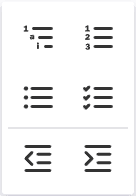
Available List Styles
| Style | Description |
|---|---|
| Mixed | Combines different list markers at different indent levels. |
| Numbered | Uses sequential numbers (1, 2, 3, etc.). |
| Bullets | Uses bullet points for each item. |
| Ticks | Uses checkmark symbols for each item. |
List Features
- Easily indent and outdent your content using Tab and Shift+Tab.
- Create multiple lists within the same shape.
- Use different list styles within the same object.

Applies To: Members
Plan Availability: Free*, Education Free, Standard, Premium