
Changing the Object Shape
Transform HuddleIQ objects between different shapes and sticky notes using the change shape tool, with options for squares, circles, triangles, and more.
The Change Object Shape feature in HuddleIQ allows you to transform objects between different shapes or convert them to and from sticky notes.
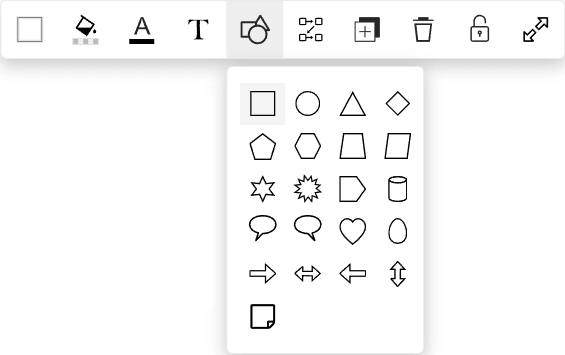

Available Shape Options
| Shape Category | Options |
|---|---|
| Basic Shapes | Square, Circle, Triangle, Diamond, Pentagon, Hexagon |
| Special Shapes | Trapezoid, Parallelogram, Star, Star Burst, Flag, Cylinder |
| Communication | Talk Bubbles |
| Decorative | Heart, Egg |
| Arrows | Block Right Arrow, Block Left Arrow, Block Horizontal Two Way Arrow, Block Vertical Two Way Arrow |
| Notes | Sticky Note |
Color Reset Behavior
| Action | Result |
|---|---|
| Changing to a flag or sticky note | Background color resets to default |
| Changing away from a flag or sticky note | Background color resets to default |
Applies To: Board Hosts, Board Facilitators, Board Editors
Plan Availability: Free*, Education Free, Standard, Premium